

Forum Replies Created
-
AuthorPosts
-
October 1, 2026 at 1:10 pm in reply to: How do I turn a holiday shopper into a repeat customer? #5278
 EmmaParticipant
One thing you could try is giving the holiday shopper reward points on their first purchase. That way, instead of just offering another discount, you’re giving them a reason to come back and use those points on their next order.
I’ve seen this done with the Points and Rewards for WooCommerce plugin, where you can award points based on the purchase amount and set an expiry period for them. This could work well after a festive sale because customers have a reason to return and use the rewards they earned during the holiday period.
It’s a pretty simple way to turn a one-time holiday purchase into an opportunity for a repeat order.
September 18, 2026 at 7:29 am in reply to: Which WooCommerce upsell plugin can schedule festive offers? #5195EmmaParticipantHi Daniel,
You could try the Upsell Order Bump Offer for WooCommerce Pro. It has a “Bump Offer Scheduling”
option that lets you set different upsell offers for specific dates, so you can plan your festive campaigns ahead instead of manually switching offers. You can also set conditions such as products, categories, or cart value to control when an offer appears.This particular functionality of this WooCommerce upsell plugin comes in handy during the hectic festive rush.
September 3, 2026 at 10:54 am in reply to: Can customers purchase products using only WooCommerce reward points? #5167EmmaParticipantYes. This is a functionality that almost all Points and Rewards plugins offer 9 out of 10 times.
But if you are using Points and Rewards for WooCommerce, we can guarantee that it allows customers to purchase eligible products using only their accumulated points. Admins can control which products or categories can be purchased with points.
August 10, 2026 at 1:04 pm in reply to: Which WooCommerce tools helps boost sales with upsells and order bumps? #5137EmmaParticipantHi!
I agree that the festive season is coming up; I am also planning to start the preparations before the festive rush takes over.
I have the perfect tool that will help you create multiple upsell and order bump offers within minutes: Upsell Funnel Builder. This tool further allows you to create targeted post-purchase and checkout upsell offers that are relevant to the customer’s purchase journey, increasing average order value without friction in the customer’s shopping experience.
This encourages customers to buy related/complementary products, which leads to conversions and impulse purchases.
July 24, 2026 at 1:16 pm in reply to: What tools customize WooCommerce checkout for client workflows in the US? #5101EmmaParticipantHi!
I would be happy to help you with a tool that would enhance your client’s WooCommerce checkout workflow. Upsell Funnel Builder for WooCommerce Pro is the answer to your question. There are many scenarios where, to increase revenue, merchants disrupt their checkout flow. Merchants sometimes create post-purchase and checkout upsell offers that are relevant to the customer’s purchase journey, or place the WooCommerce-related products, also known as ‘frequently bought together’ offers, right in the checkout, where the customer is most likely to spend.
This tool helps implement such offers to increase average order value for your clients, but also reduces friction in the customer’s shopping experience.
EmmaParticipantHi Daniel,
Let us first understand the goal of loyalty programs. The goal of customer loyalty programs is to foster customer loyalty, encourage increased customer retention, and drive continued engagement with the brand, ultimately benefiting both the customer and the business. This type of system is commonly used in various industries, including retail, eCommerce, hospitality, and online services, to create a mutually beneficial relationship between the company and its customers.
Now, if it’s worth the hype, here are some of the benefits –
- Increase in revenue
- Increases sales
- Makes customers feel more valuable
- Gathers user information and valuable data
- A mode of interaction and communication between the business and its customers
- Measure customer loyalty through engagement
- Improves customer retention while attracting new customers
- Constant improvements result in constant growth
To answer your question, yes, loyalty programs are worth the hype, and if you haven’t created one yet, start with Points and Rewards for WooCommerce
May 26, 2026 at 10:49 am in reply to: How Is Customer Lifetime Value Different From Average Order Value? #4973EmmaParticipantHi Daniel,
You are not alone. This is where many businesses get confused.
Average Order Value and Customer Lifetime Value are both revenue metrics, but they are operated on completely different levels of analysis.
Customer Lifetime Value, or popularly known as CLV, measures the total revenue a customer generates for your business over the entire period of their relationship with your brand.
Average Order Value (AOV), on the other hand, means the average amount a customer spends in a single transaction. In a nutshell, it’s a short-term transactional metric to help merchants understand how much revenue each order generates.
I hope this cleared things out for you!
EmmaParticipantQR Codes are widely used for seamless event check-ins, because they are –
- Secure: Duplicate entries or fraudulent attendees are flagged instantly.
- Accessible: Both organisers and attendees can manage QR code check-ins via smartphones.
- Accurate: Each event tickets for WooCommerce have a unique code linked to its purchase.
- Fast: Each scan to verify the authenticity takes seconds.
- Scalable: Suitable for small workshops or huge concerts.
There are many event plugins, such as Event Tickets Manager for WooCommerce, that help event organisers incorporate QR Codes in the event tickets that they are purchasing.
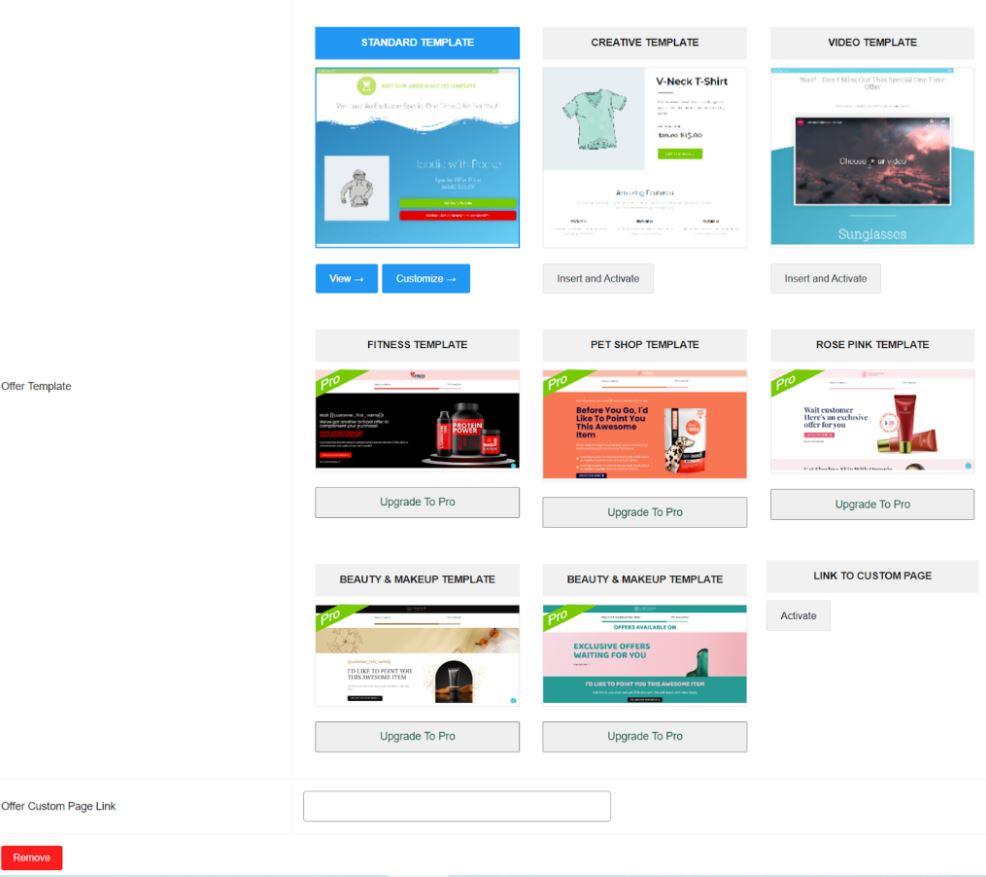
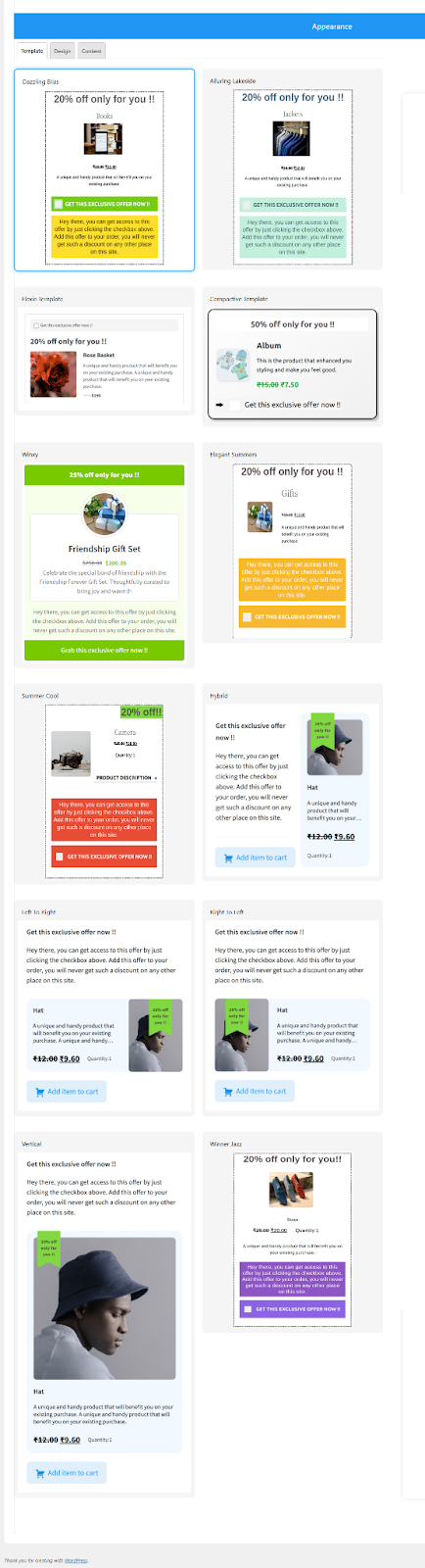
April 30, 2026 at 1:34 pm in reply to: Can I add more templates for bump offers as per my website design? #4897EmmaParticipantYes, you can add more than one template with different designs and colors. In the free version, they have provided two free templates, and in the premium version, more than 10+ templates have been added, and more are coming soon.
If you want to build your own template with them, you can connect to their support team (Submit Query), as template designs are responsible for converting your sales.
Templates For Upsell Offers –
Templates For Bump Offers –
 April 7, 2026 at 7:07 am in reply to: How would you handle frequent appointments with no-shows? #4840EmmaParticipant
Hello!
If you are using Event Tickets Manager for WooCommerce, you can handle the issue of frequent appointment no-shows in the following ways-
- Send emails/SMS reminders
- Take payments upfront
- Integration with Google Calendar
- Auto-reject unpaid bookings after a specified time
- A centralised view for bookings to easily cancel the bookings
If you want to discover more strategies to reduce no-shows – How To Reduce No-Shows in WordPress Bookings? (2026 Edition)
February 24, 2026 at 1:11 pm in reply to: How to run multiple upsell and order bump campaigns? #4775EmmaParticipantHi!
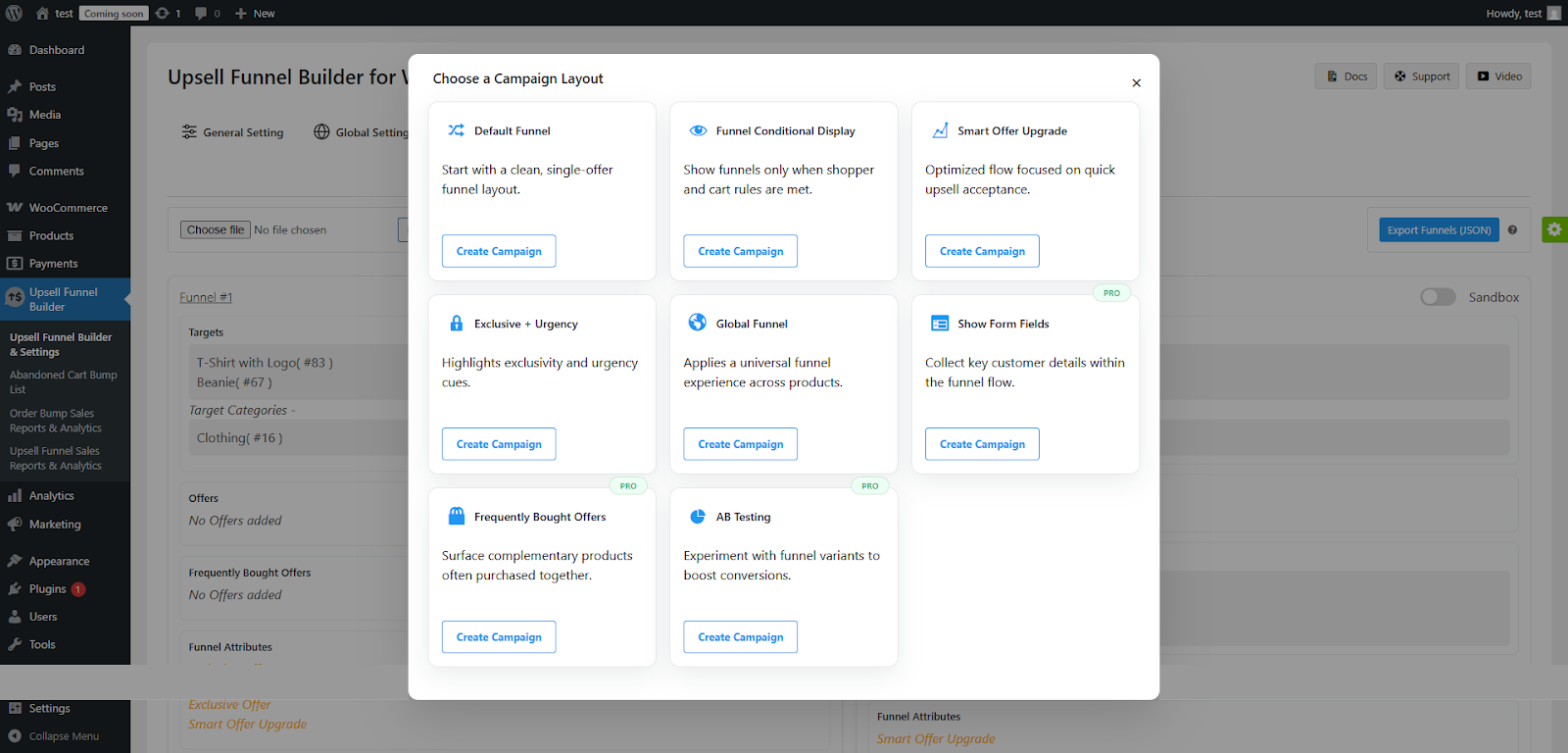
I understand it can be confusing, as there are many features to configure. But as you use the Upsell funnel builder, you can easily run multiple order bump and upsell campaigns with the help of pre-built templates.
Click on the “Create Campaign” button after choosing from the predefined campaigns. Here’s an example –
 January 21, 2026 at 1:40 pm in reply to: If I Reschedule an event, how will the customers get to know? #4685EmmaParticipant
Hi Daniel,
You can automatically inform your attendees if you reschedule an event. How? By implementing the Event Tickets Manager for WooCommerce plugin.
Merchants can keep customers informed about date changes for a specific event by utilizing the Event Reschedule Notifications functionality.
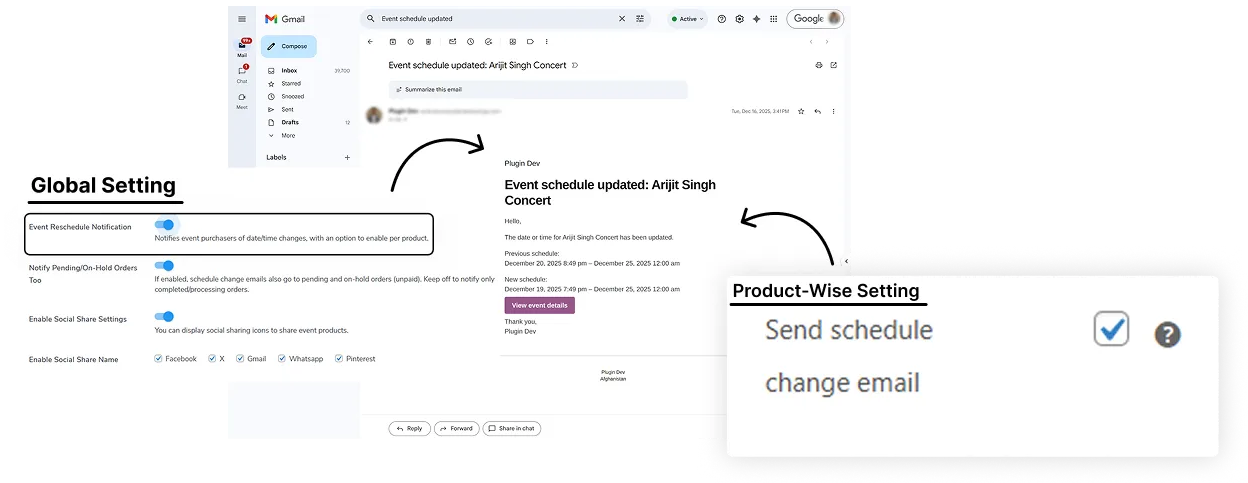
They will receive a notification via the email address shared while placing the order for the event.
November 20, 2025 at 4:16 am in reply to: What are the benefits of using Conditional Visibility for Offers? #4508EmmaParticipantHi Daniel,
Here are some of the benefits of using the Conditional Visibility for Offers feature –
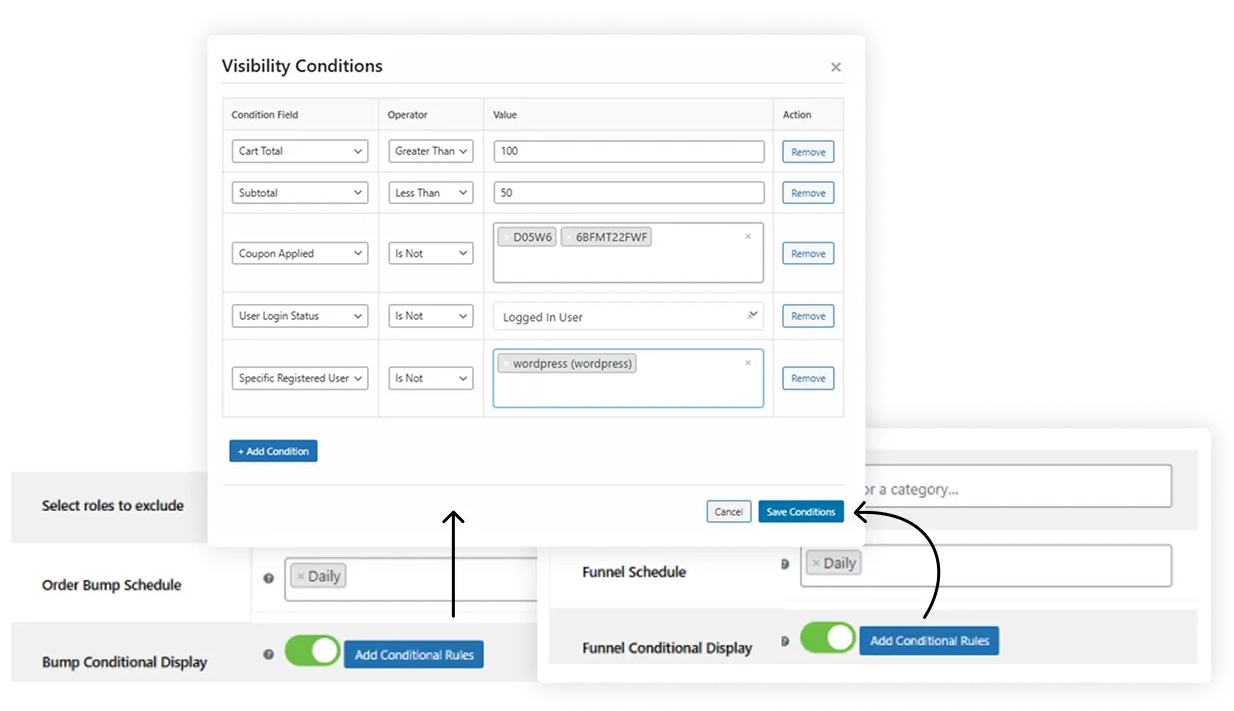
1. Increase Average Order Value. When conditions are based on the Cart total or the Subtotal, merchants can strategically trigger a desirable offer when the customer is hesitant to make the final purchase.
2. Improves Relevance and Personalization. When bump or Funnel Offers are only shown when they directly apply to the user’s current cart state or status (User Login Status, Registered Users).
3. Maximizes the Conversion Rates. By utilizing this functionality, merchants can ensure that the right kind of offer reaches the customers at the right time.
These were the top three benefits of using this functionality correctly.
November 3, 2025 at 9:55 am in reply to: How to Create Abandoned Cart Bumps, and Utilize It To My Store’s Benefit? #4468EmmaParticipantMerchants can utilize the compatibility of the WooCommerce Cart Abandonment Recover plugin with the Upsell Funnel builder to create bump offers targeting the customers who have abandoned their carts.
These bump offers will showcase products related to those the user has abandoned, increasing the chances of converting them into customers.
This functionality comes in handy, especially during the festive season, because even if your customers are abandoning their shopping carts, you can still target them by showing them bump offers of the items that they have abandoned.
October 6, 2025 at 11:31 am in reply to: How To Optimize My WooCommerce Store For The Festive Season? #4399EmmaParticipantHey!
I understand the festive season means an increased inflow of demand, and it gets overwhelming to manage the traffic. As merchants, you must ensure that your store is ready for all the festive madness.
Now, let’s look at the Top 10 WooCommerce plugins that turn seasonal shoppers into loyal customers,
1. Boost The Average Order Value With Upsell Funnel Builder
2. Make Gifting Effortless With Gift Cards For WooCommerce
3. Turn Seasonal Buyers Into Loyal Customers With Points and Rewards for WooCommerce
4. Simplify Returns, Exchanges, and Cancellations With RMA Return, Refund & Exchange For WooCommerce
5. Amplify Reach Through Referrals & Coupons With Coupon Referral Program for WooCommerce
6. Enhance Transparency With Order Tracking With Track Orders for WooCommerce Pro
These WooCommerce plugins will help you optimize your WooCommerce store for the upcoming festivities. Want to know more about them? – Top 6 WooCommerce/WordPress Holiday Plugins to Maximize Sales for Halloween, BFCM & Christmas 2025
-
AuthorPosts
