- This topic is empty.
Viewing 2 posts - 1 through 2 (of 2 total)
- You must be logged in to reply to this topic.
› Forums › WordPress/WooCommerce › How do you track SKU-level profitability in WooCommerce?
Tagged: Track Orders
Hey folks,
I run a WooCommerce store, and while revenue is growing, I’ve noticed a major blind spot, refunds and returns aren’t linked to individual SKUs to track profitability and top refund reasons.
Can the RMA Plugin help me with this?
The default WooCommerce setup makes it hard to trace these back to individual SKUs, especially when only one product in a multi-item order gets refunded or exchanged.
Most analytics plugins show sales, but not true profit after returns, and Most WooCommerce store owners are laser-focused on:
– Revenue growth
– Order volume
– Conversion rate
Your most “profitable” SKU might be losing you money—if refunds and returns aren’t tracked accurately.
Here’s how you can get closer to accurate SKU-level profitability tracking using the RMA for WooCommerce Plugin Pro, and RMA for WooCommerce Free Version, as mentioned in the Documentation
✅ Step 1: Install and Activate the Plugin
📦 Step 2: Enable Return and Refund Settings
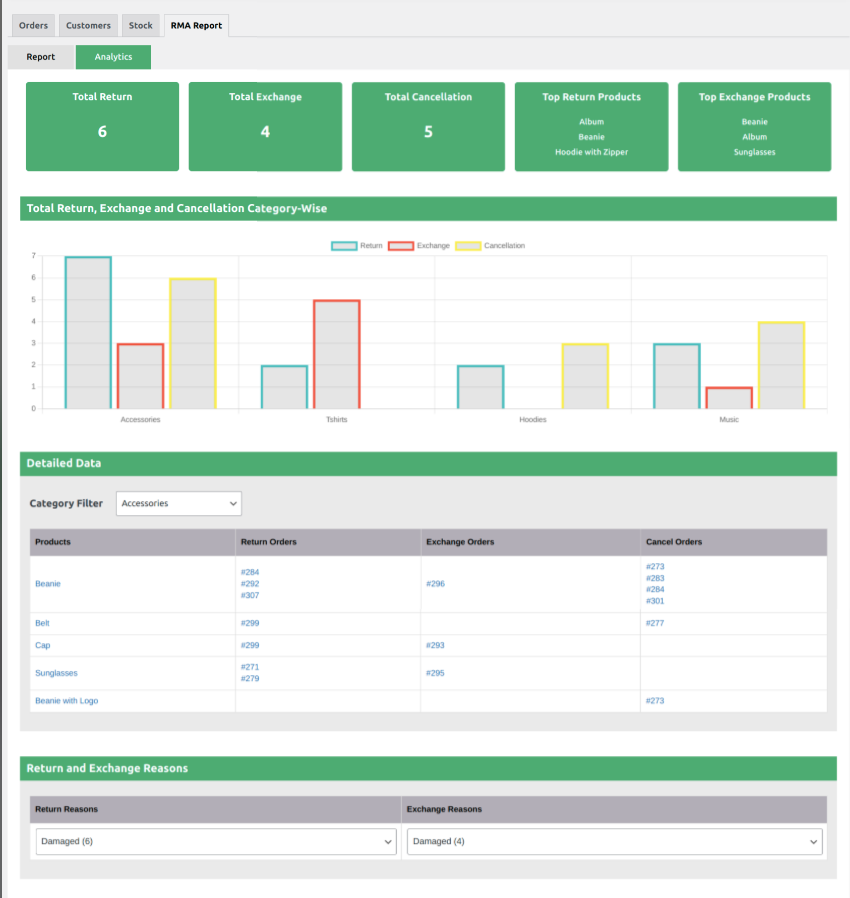
🗂️ Step 3: Use the RMA Report
Here, you’ll see a complete list of return/refund/exchange requests with:
📊 Step 4: Analyze the Data
Filter or sort reports by SKU to check which products are being returned/refunded the most