

Forum Replies Created
-
AuthorPosts
-
 DanielParticipant
Yes, Your Customers can recharge their gift cards and extend their usability. Customers have to go to the My Account >> Gift Cards tab.
There, they can enter the price and coupon code and hit the Recharge button. Afterward, they can place a gift card recharge order. After successful order placement, the card will be recharged.
October 5, 2023 at 4:56 am in reply to: How Can I Display Related Subscription Information on the Thank You Page? #2249DanielParticipantHi,
Subscription related details will automatically shown to customers after purchasing any subscription products.
The customer will be shown a related subscription table on the WooCommerce Thank You page.
The table will contain details regarding the subscription ID, status, next payment date, and order total.
Hope that helps!
September 19, 2023 at 4:23 am in reply to: How is the Sales Funnel Report shown in a dashboard view in WooCommerce Upsell? #2193DanielParticipantHey,
Yes, there is a feature to view your sales funnels report in a dashboard view.
Navigate to the Sales and Report Section and Click on Upsell Sales – Reports.
From here you can view your reports in a dashboard view and check the upsell reports for a specific time period in metrics like Net upsell sales, Average net daily upsell sales, Upsell orders placed, Upsell items purchased and Upsell refunded items. You can also filter the report according to the product or category.
Hope that Helps!
August 25, 2023 at 4:52 am in reply to: Does your solution Sync Orders with the existing account on Salesforce? #2114DanielParticipantHello Emma,
Yes, WooCommerce Salesforce Integration now syncs the orders for those accounts that already exist in Salesforce CRM which will remove duplicate account creation during the order sync from WooCommerce to Salesforce.
August 10, 2023 at 1:35 pm in reply to: How can I Offer Membership Discount on Subscription Products? #2026DanielParticipantHey,
I totally understand your question. To offer membership discounts on subscription products or services you have to install the Membership for WooCommerce
It’s a membership plugin by Wpswings that is compatible with the Subscription plugin.
After installing and enabling it, Create your membership tier.
After creating your Membership Tier.
Go to Dashboard > Products > All Products > Any Variable Subscription Product > Subscriptions Settings
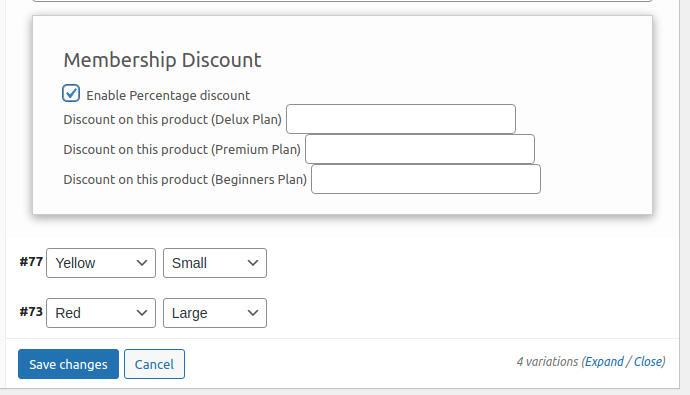
From Here you can Enable Percentage Discount and offer membership discounts on your subscription products.
Hope that helps.
August 7, 2023 at 1:16 pm in reply to: What should we do if the calendar has additional unavailable dates? #2000DanielParticipantIf there are more unavailable dates in the calendar, there are a few options to manage them using the Bookings for WooCommerce plugin:
- Use the Dual Calendar feature in the Bookings for WooCommerce Pro plugin. This feature allows merchants to specify the dates of booking that are unavailable and the dates that are available.
- Use an add-on plugin like “Book Dates Across Unavailable Days” for WooCommerce Bookings. This add-on allows customers to choose a flexible calendar range when there are a few unavailable days in between the range.
- Use the “One-day unavailability settings” in the Bookings for WooCommerce plugin to mark bookings as unavailable for a day or upcoming event or holiday.
- Mark the unavailable dates in the calendar manually and communicate them to customers through the booking system or other means.
The Single Calendar feature displays all bookings in one calendar, while the Dual Calendar feature displays two separate calendars for different booking resources.
August 7, 2023 at 1:11 pm in reply to: How can I create a WooCommerce Point system for my online store? #1971DanielParticipantHello Karen,
First of all, Congratulations on your new eCommerce Store.
You can very easily and effortlessly create a WooCommerce Point System for your website.
How? By installing Points and Rewards for WooCommerce.
To download the premium plugin which you purchased, please follow the below steps:-
1. Go To https://wpswings.com/my-account
2. Visit Orders Section
There you will get a License code and a Premium purchased plugin zip file.
Download and use it on your website by activating it
Note: You need to have Free and Pro Both plugins in order to use them smoothly
Confused about how to start the features and the next steps? Read more about the same in the Points and Rewards Documentation.
If you have any more questions, you can reach out to me on the same thread.
Have a nice day!
April 27, 2023 at 1:37 pm in reply to: How to Sync the Tax value and Tax rate with Quickbooks Integration? #1862DanielParticipantHello, you can do this very easily with the QuickBooks Integration plugin. It consists of feeds for objects which include products, customers, and invoices. For syncing the WooCommerce object data with the feeds, first, you need to select the object, then Map QuickBooks fields to WooCommerce fields. You can add a new field and select a field that will work as Primary Key. Opt the event for triggering the data sync and finally map your objects with the feeds.
April 26, 2023 at 1:03 pm in reply to: How can I enable my customers to transfer their purchased tickets to others? #1840DanielParticipantYes, we do have a feature to choose from the multiple tickets layouts.
There is a new feature in the latest version of Event Ticket Manager for WooCommerce plugin
1. Go to the PDF Ticket Layout Setting tab

2. Choose your desirable layout
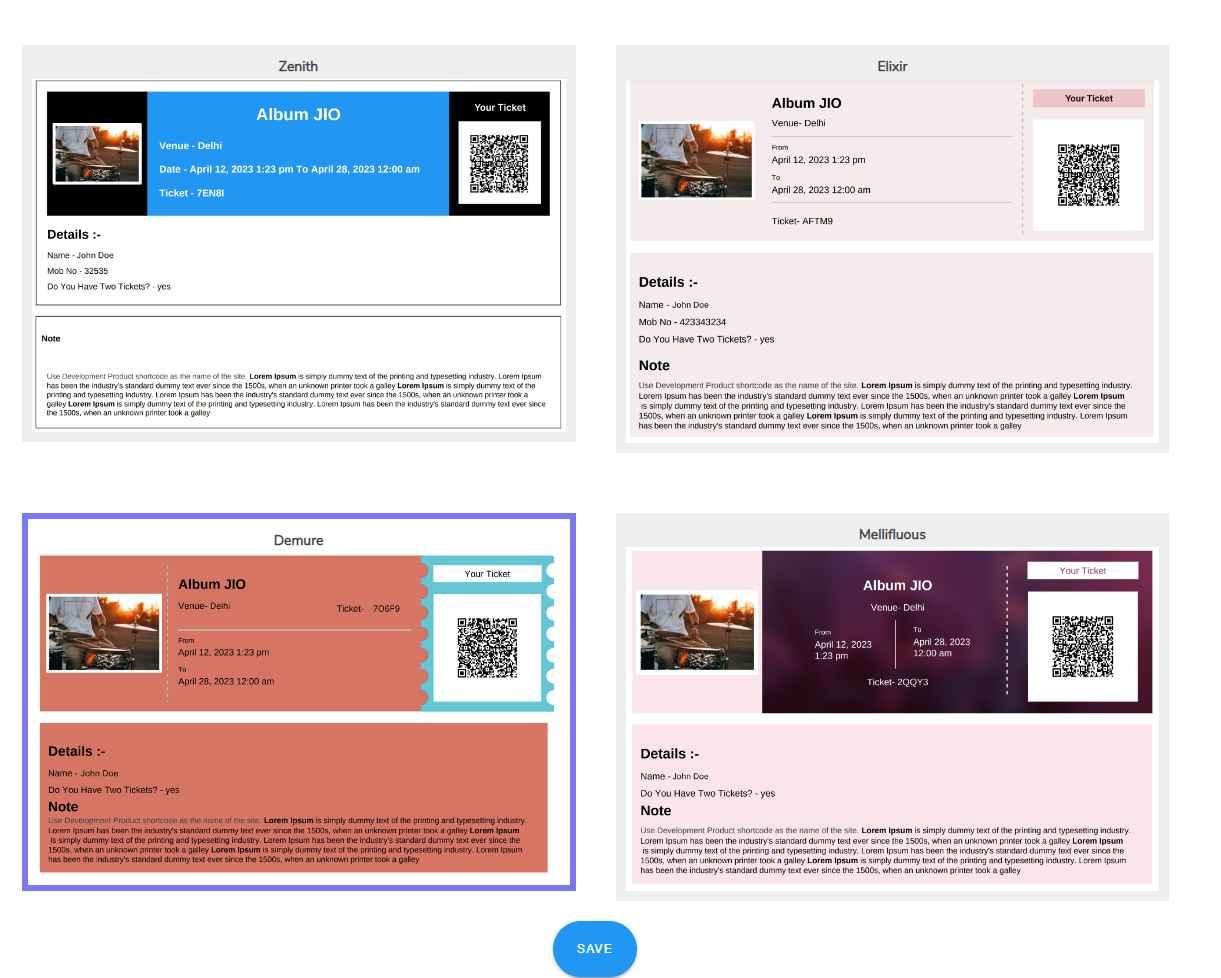
Here are multiple layouts you can choose from according to your event preference.
3. Click on the Save button to apply the layout
Using this feature you can provide users with more personalized and visually appealing tickets
February 7, 2023 at 1:30 pm in reply to: Can we use the Salesforce plugin to inspect the sync error logs? #994DanielParticipantThere is an option for Data logs in Salesforce that list all the WooCommerce data synced to your Salesforce CRM, which you can delete manually or automatically.
Yes, the plugin has the option of “Filter in the log table” to easily filter out the logs with errors in the synced data and further delete or work on them accordingly. If you are planning to get the salesforce plugin for WooCommerce, I personally recommend going for Salesforce Integration for WooCommerce.
January 31, 2023 at 1:03 pm in reply to: How can I set different Order Bumps for multiple products in the cart? #920DanielParticipantIn this case, you can skip the bump offer. To do this, go to the “Global Settings” of the Order Bump plugin. There you’ll find a feature called, “Skip for Same Offers.” Click on the dropdown in front of it, select Yes, and save the changes
Now if a customer has added an order bump offer product in the cart, the funnel won’t trigger.
January 30, 2023 at 11:47 am in reply to: How can I set different Order Bumps for multiple products in the cart? #893DanielParticipantYes, you can set different order bump offers for other products with the premium version of the WooCommerce order bump plugin. You can select a specific target and relevant bump offer product while creating your bump offer funnels.
Visit the WooCommerce Order bump pro plugin to explore the functionalities and better understanding of the plugin
January 19, 2023 at 1:26 pm in reply to: How to customize swatches and variations of my store products? #796DanielParticipantIf I want to set up the variation gallery in video format instead of images, can it be done with Advanced Variation? If yes, please suggest how?
January 16, 2023 at 10:20 am in reply to: How to Sync the Tax value and Tax rate with Quickbooks Integration? #723DanielParticipantYes, you can sync tax value, tax rate, and other tax values to QuickBooks invoices if you have an updated version of the plugin. While syncing the orders, the tax value and rate will be synced automatically whenever the order is placed.
Just make sure if you want to sync correctly with the orders at both ends, the same tax rate must be created at the QuickBooks invoice end as well.
December 27, 2022 at 5:17 am in reply to: Where can I get more Pre-built templates for Order Bump and can I relocate it? #537DanielParticipantYes, you can customize Bump Offer Box, Discount Section, Product Section, Accept Offer Section, Offer Description Section. And also preview the real-time changes in template.
-
AuthorPosts
