-
AuthorSearch Results
-
February 24, 2026 at 1:11 pm #4775
In reply to: How to run multiple upsell and order bump campaigns?
EmmaParticipantHi!
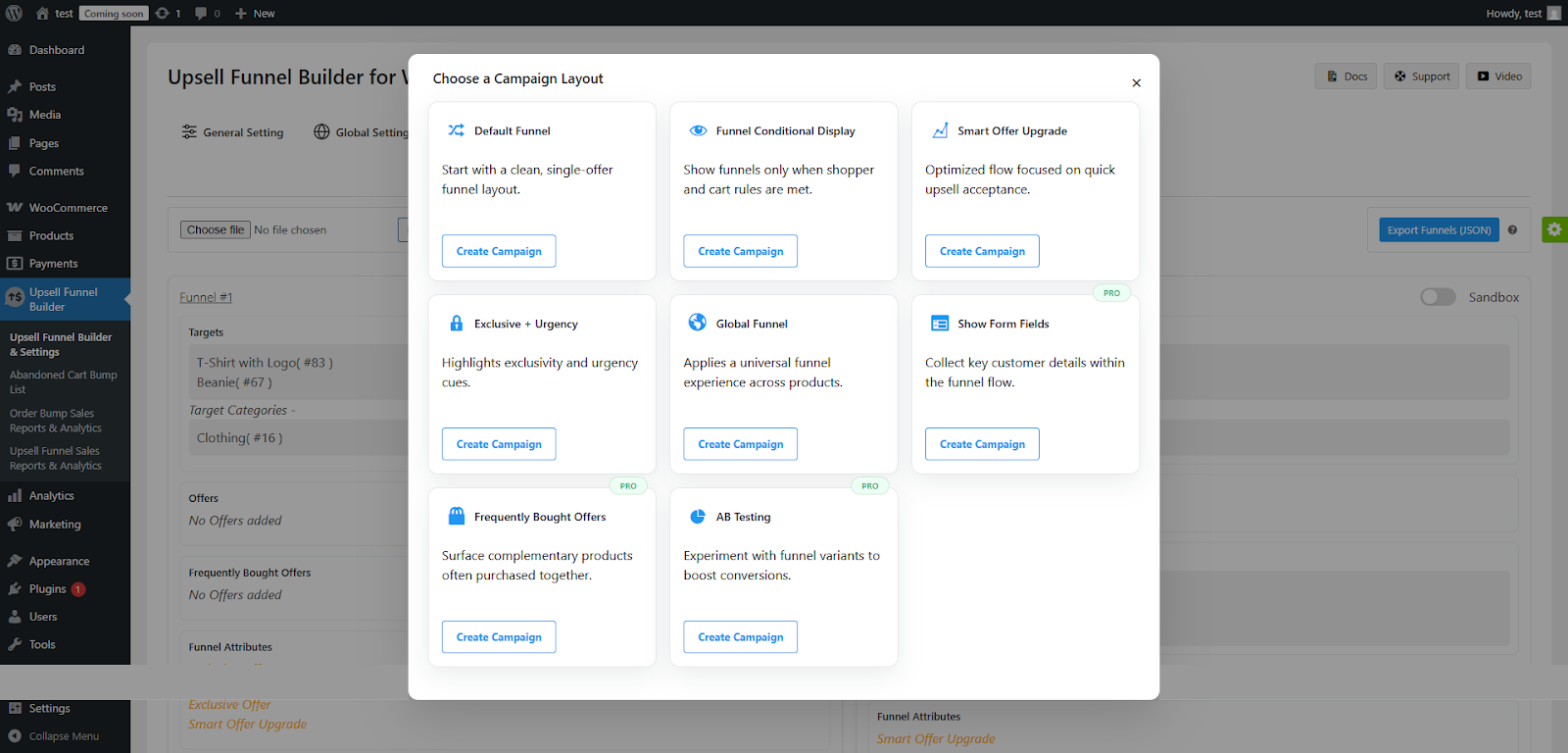
I understand it can be confusing, as there are many features to configure. But as you use the Upsell funnel builder, you can easily run multiple order bump and upsell campaigns with the help of pre-built templates.
Click on the “Create Campaign” button after choosing from the predefined campaigns. Here’s an example –
February 24, 2026 at 11:48 am #4767
DanielParticipantHi! I want to run multiple order bump and upsell campaigns, but I am confused about which settings I should configure for these campaigns to perform well.
I am currently using Upsell Funnel Builder for WooCommerce.
Can someone help?
February 23, 2026 at 11:46 am #4763
ZainParticipantLow popup submission rates in e-commerce stores are typically caused by the following factors:
1. Poor Timing: Displaying a popup the instant a page loads can feel intrusive, while showing it too late may miss the opportunity to convert a visitor before they leave.
2. Lack of Segmentation: Showing the same popup to every visitor, regardless of whether they are new, a repeat customer, or an existing subscriber, results in irrelevant messaging that fails to convert.
3. High Friction and Complexity: Asking for too much information or having too many input fields increases the effort required to subscribe,. Additionally, using a double opt-in process significantly lowers submission rates compared to single opt-in because many users fail to complete the second verification step.
4. Poor Mobile Optimization: Since a majority of traffic is mobile, popups with tiny fonts, hidden close buttons, or forms that do not fit mobile screens create a frustrating user experience.
5. Frequency Fatigue: Showing the same popup repeatedly to the same person without variation leads to annoyance and “fatigue,” making the visitor less likely to engage.
If you’re running WooCommerce and serious about improving AOV without hurting UX, building structured upsell flows will always outperform generic popups.
Analysis of industry data reveals a significant performance gap: while the average pop-up submit rate is approximately 4.65%, top-tier performers (the top 10%) achieve conversion rates as high as 19.77%. Achieving this high-level performance requires a shift from viewing pop-ups as interruptions to treating them as personalized value exchanges.
And this is where WooCommerce Upsell Plugin changes the game.
Furthermore, businesses must balance list growth speed against quality, choosing between single opt-in (1.28% subscription rate) and double opt-in (0.33% subscription rate, but higher engagement) while remaining compliant with Google’s 2025 interstitial standards to avoid SEO penalties.
February 5, 2026 at 5:01 am #4717In reply to: Cross Sell Vs Upsell ?
ChristopherParticipantFrom what I’ve seen across ecommerce accounts both work, but they hit differently depending on timing and intent.
Quick breakdown:
Upselling usually wins when:
– The core product already solves the main pain
– The upgrade clearly removes friction or unlocks a “power” feature
– Users have already touched value (trial, usage, first success moment)Best performing spots:
– Inside the app after activation
– Usage-limit walls (“you’re close to your cap”)
– Post-trial downgrade screens
– Plan comparison pagesCross-selling usually wins when:
– The add-on is tightly connected to the main job-to-be-done
– It saves time or reduces setup effort
– It feels like a bundle, not a random extraBest performing spots:
– Cart + checkout (but keep it light)
– Post-purchase one-click offers
– Lifecycle emails after first purchase
– “People also use” inside dashboardsWhat actually drives more revenue?
Short term → cross-sell often lifts AOV faster.
Long term → upsell usually drives more LTV.Cross-sells are snackable. Upsells are compounding.
February 3, 2026 at 1:07 pm #4705Samael
KeymasterCelebrate WP Swings’ Birthday with special savings! Enjoy a flat 30% OFF on all WooCommerce plugins.
Use code BIRTHDAY30 at checkout and build smarter while saving more 🎉
BEST SELLING PRODUCTS:
- With WooCommerce Points and Rewards, you can use coupons and redeemable points to reward your customers and gain their loyalty in return.
- Give your online store a recurring business strategy through WooCommerce subscription so you may provide easy and changeable subscription-based goods and services.
- Create, sell & manage WooCommerce gift cards in your store with 20+ Predefined templates for all occasions and also generate gift coupon codes, QR codes, and barcodes for faster redemption.
- Give guest visitors with WooCommerce RMA an easy-to-use interface for requesting refunds, exchanges, and cancellations of the purchased item.
- Using WooCommerce Order Bump, you can create one-click upselling offers on the checkout page that raise AOV and enhance earnings.
- Increase sales and profits with post-purchase WooCommerce upselling offers and skyrocket the business AOV.
With our WooCommerce Plugins, you can develop your online shop company by increasing revenue and engagement
🔥 Power Up Your Store as WP Swings Celebrates Its Birthday! Enjoy Flat 30% OFF on All WooCommerce Plugins
- Build Loyal Customers with our Bestseller Plugins Pack
- Retain Customers and Increase Recurring Revenue
- Improve Revenue with ChartBuster Upselling Solutions

Enjoy a flat 30% OFF with code BIRTHDAY30 and give your store the power to grow! 🎁
Don’t miss out on this limited-time WP Swings deal. Grab it today! 🚀
January 23, 2026 at 5:02 am #4693In reply to: Post purchase upsell pages example?
ZainParticipantMost articles explain what post-purchase upsell pages are, this goes a step further and breaks down the new, often-missed mechanics that actually decide whether they lift AOV or quietly create refunds, tracking gaps, and operational chaos.
New / Under-Discussed Topics Around Post-Purchase Upsell Pages.
1. Behavior-Driven Upsells (Not Product-Driven)
Upsells based on how someone checked out (coupon user, express checkout, repeat buyer) convert better than generic “related products.”2. Post-Purchase as a Micro-Funnel (Not a Single Page)
Top stores run a 2–3 step flow: upsell → downsell → thank-you, instead of one screen and done.3. When You Should NOT Show a Post-Purchase Upsell
High-ticket items, stress purchases, or first-time buyers can see higher refund rates when upsells are forced.4. Fulfillment & Refund Risk (Hidden Cost)
Post-purchase upsells complicate:– Partial refunds
– Inventory sync
– Split shipments
– Most guides ignore this completely.5. GA4 Attribution Blind Spots
Upsell revenue is often overreported because refunds, margins, and multi-event purchases aren’t attributed correctly.6. Design Psychology Shift After Checkout
Post-purchase pages convert better with less hype, fewer visuals, and clearer copy—opposite of checkout pages.7. Contextual Comparison: Order Bump vs Post-Purchase vs Thank-You Page
Each moment has a different user mindset and should sell different things.8. Time-Delayed Post-Purchase Upsells
Some of the highest-converting upsells happen after delivery, not immediately after checkout.9. Margin-First Upsell Strategy (Not AOV-First)
Increasing AOV without tracking fulfillment and refund costs can reduce actual profit.January 16, 2026 at 10:05 am #4668
ZainParticipantMost eCommerce brands focus heavily on customer acquisitions. Very few invest the same energy into extracting more value from existing customers, even though the data is already there.
If a customer completes a purchase, GA4 captures the entire purchase journey in real time. That journey holds clear signals for identifying cross sell and upsell opportunities, if you know where to look.
Turn post-purchase insights into scalable upselling and cross selling strategy using GA4, Looker, and WooCommerce funnels.
Why Conversion Data Is More Powerful Than Traffic Data
When an eCommerce conversion happens:– GA4 tracks the full journey automatically
– Every product page, category, and URL visited is logged
– You can see which products or services were explored but not purchased
– These are not random clicks.They represent high-intent interest in specific products and services.
Step 1: Track the Post-Purchase User Journey in GA4
GA4 tracks the purchase lifecycle through events like:– view_item
– add_to_cart
– begin_checkout
– purchaseFocus only on users who completed a purchase and analyze their journey backward.
This reveals:
Products viewed but not bought
Categories explored before checkout
Drop-off points during comparison
These insights form the foundation for cross selling opportunities and upsell opportunities.Step 2: Identify Products Viewed but Not Purchased
A common pattern in GA4:– User buys Product A
– User viewed Product B and C
– User exits after purchaseThese skipped items often fall into two buckets:
Complementary products (natural add-ons)
Higher-tier or premium alternativesThis is where predictive analytics starts, because behavior predicts future intent better than assumptions.
Step 3: Visualize Patterns in Looker Using Converted Users
GA4 shows paths.
Looker shows patterns at scale.In Looker:
– Segment converted users
– Group journeys by purchase history
– Identify frequently viewed additional products alongside the purchased itemWhen hundreds of customers follow similar paths, you’re not guessing anymore.
You’re building a data driven upsell and cross-sell framework.Step 4: Understand the “Why” Without Over-Analyzing
There can be multiple reasons why a user didn’t buy:– Price sensitivity
– Timing issues
– Decision fatigue
– Lack of urgencyInstead of forcing the purchase immediately, the smarter move is:
👉 Change when you offer it.
Post-purchase upselling and cross selling works because:
Trust is already established
Friction is lower
The customer is in a buying mindset
This approach naturally encourages customers to consider more value.Step 5: Turn Unpurchased Products into Cross-Sell Offers
Using GA4 + Looker insights:– Map frequently viewed items as complementary products
– Offer them post-purchase or on the thank-you page
– Add light incentives like discounts or bundlesThis improves customer relationships while increasing average order value.
You’re not pushing.
You’re completing the original intent.Step 6: Convert Comparisons into Upsell Opportunities
Upsells are easiest when:– Customers compared multiple products
– Purchased a lower tier
– Explored premium features earlierGA4 reveals this clearly.
Post-purchase upsells work because:
– The decision isn’t rushed
– The value is already understood
– The upgrade feels optional, not forcedThis is how brands increase revenue without harming experience.
Step 7: Execute the Strategy with an Upsell Funnel Builder Plugin
Insights alone don’t boost revenue. Execution does.An Upsell Funnel Builder Plugin allows merchants to:
– Create post-purchase upsell funnels
– Show relevant additional products
– Trigger offers based on purchase history
– Apply conditional logic and discounts
– Maintain a smooth checkout experience
– This turns analytics into action, without manual work.Why This Strategy Scales Better Than Traditional Promotions
– Uses real customer behavior, not assumptions
– Focuses on existing customers, not just new traffic
– Improves customer relationships alongside revenue
– Aligns analytics with WooCommerce execution
– Reduces dependency on aggressive discountsThis is modern eCommerce growth, quiet, intelligent, and repeatable.
January 5, 2026 at 12:38 pm #4617
ChristopherParticipantIf you’re looking for an affordable, WordPress-focused sales funnel solution, Upsell Funnel Builder for WooCommerce by WP Swings stands out as the hero choice.
It offers powerful upsells, cross-sells, and order bumps, even in the free version, making it perfect for stores that want to increase AOV without extra complexity or cost.

1. Upsell Funnel Builder (WP Swings) – Best overall budget-friendly hero plugin for WooCommerce funnels and checkout-stage upsells.
2. CartFlows – Great for improving checkout flow, especially for beginners.
3. FunnelKit – Ideal for advanced users who need full marketing automation and deep funnel analytics.
4. OptimizePress – Best for visually rich landing pages and sales funnels.
5. SeedProd – Simple and fast landing page + funnel builder for WooCommerce.
Quick take:
Start with Upsell Funnel Builder by WP Swings for maximum value at minimal cost.November 20, 2025 at 4:16 am #4508
EmmaParticipantHi Daniel,
Here are some of the benefits of using the Conditional Visibility for Offers feature –

1. Increase Average Order Value. When conditions are based on the Cart total or the Subtotal, merchants can strategically trigger a desirable offer when the customer is hesitant to make the final purchase.
2. Improves Relevance and Personalization. When bump or Funnel Offers are only shown when they directly apply to the user’s current cart state or status (User Login Status, Registered Users).
3. Maximizes the Conversion Rates. By utilizing this functionality, merchants can ensure that the right kind of offer reaches the customers at the right time.
These were the top three benefits of using this functionality correctly.
November 18, 2025 at 11:36 am #4500
DanielParticipantHi!
I was just curious, what are the benefits of using conditional visibility for offers? I have a WooCommerce store, and I have just started using Upsell Funnel Builder for WooCommerce. I believe that an in-depth understanding of this functionality will help me implement it more efficiently.
November 3, 2025 at 9:55 am #4468
EmmaParticipantMerchants can utilize the compatibility of the WooCommerce Cart Abandonment Recover plugin with the Upsell Funnel builder to create bump offers targeting the customers who have abandoned their carts.
These bump offers will showcase products related to those the user has abandoned, increasing the chances of converting them into customers.
This functionality comes in handy, especially during the festive season, because even if your customers are abandoning their shopping carts, you can still target them by showing them bump offers of the items that they have abandoned.
October 6, 2025 at 11:31 am #4399
EmmaParticipantHey!
I understand the festive season means an increased inflow of demand, and it gets overwhelming to manage the traffic. As merchants, you must ensure that your store is ready for all the festive madness.
Now, let’s look at the Top 10 WooCommerce plugins that turn seasonal shoppers into loyal customers,
1. Boost The Average Order Value With Upsell Funnel Builder
2. Make Gifting Effortless With Gift Cards For WooCommerce
3. Turn Seasonal Buyers Into Loyal Customers With Points and Rewards for WooCommerce
4. Simplify Returns, Exchanges, and Cancellations With RMA Return, Refund & Exchange For WooCommerce
5. Amplify Reach Through Referrals & Coupons With Coupon Referral Program for WooCommerce
6. Enhance Transparency With Order Tracking With Track Orders for WooCommerce Pro
These WooCommerce plugins will help you optimize your WooCommerce store for the upcoming festivities. Want to know more about them? – Top 6 WooCommerce/WordPress Holiday Plugins to Maximize Sales for Halloween, BFCM & Christmas 2025
September 23, 2025 at 4:46 am #4356In reply to: What are common upselling mistakes?
ZainParticipantGreat question — upselling can really boost revenue, but it’s also super easy to get wrong.
Here are six mistakes I see all the time (and how to fix them):
1.Not understanding your customer
– Mistake: Throwing the same upsell at everyone.
– Fix: Personalize offers based on what they actually bought. For example, if someone grabs running shoes, offer them socks or a water bottle, not something random.2.Pushing upsells too early
– Mistake: Dropping an upsell before they’ve even finished checkout. That’s just annoying.
– Fix: The best spot is after purchase, when they’re already in buying mode. One-click post-purchase upsells work wonders here.3.Overloading with options
– Mistake: Showing 3–5 upsells at once. It feels overwhelming and most people just skip.
– Fix: Keep it simple with one offer at a time, maybe followed by a downsell if they say no.4.Using bland copy
– Mistake: “Buy more, save more” type lines that don’t excite anyone.
– Fix: Make the upsell page actually engaging. Use visuals, highlight benefits, and tie it back to what they just bought.5.Not tracking results
– Mistake: Setting upsells once and never checking performance.
– Fix: Keep an eye on conversions, test different offers, and see what sticks.6.Forgetting the customer experience
– Mistake: Making upsells feel like a pushy sales trick.
– Fix: Treat it like adding value. Frame it as “this will make your purchase better/easier/more fun” rather than just “give us more money.”#START SELLING MORE TODAY
Upsell Funnel Builder Pro – WooCommerce Upsell plugin
Upsells should feel like a natural extension of the shopping journey, not a roadblock. When done right, they boost AOV (average order value) and improve customer experience.
September 22, 2025 at 12:09 pm #4354
DanielParticipantHi!
You can utilize Upsell funnel builder’s compatibility with the WooCommerce Cart Abandonment Recovery plugin to create bump offers targeting the customers who have abandoned their carts. These bump offers will showcase offers related to the products that your customers have abandoned. This increases the chances of converting the user into a customer.
August 14, 2025 at 12:28 pm #4238
ZainParticipantI’ve actually tested the blinking arrow on a couple of WooCommerce stores I manage, and honestly… it works way better than I expected.
It’s not like a giant pop-up or flashing banner, just a tiny bit of motion to break the checkout monotony.
Humans are hardwired to notice movement, so the arrow acts like a “psst, look here” without interrupting the flow.
Before adding it, our bump offer was getting decent impressions but meh clicks. After enabling the blinking arrow:
- Click-throughs went up noticeably (no hard sell, just more eyes on it)
- AOV saw a small bump, too
- No complaints from customers about it being distracting
I used a Upsell Funnel Builder plugin that lets you toggle it on in a couple of clicks, so there wasn’t any dev work involved.
( As Per Documentation ) Just Go to:
- WooCommerce → Order Bump → Edit (or create) an offer.
- Find the Design/Appearance Tab
- This section controls how the bump is displayed at checkout.
- Look for “Enable Arrow”
- It’s click on the Checkbox to enable.
If you’re running upsells or bumps in checkout, I’d say it’s one of those “small tweak, big payoff” moves.
-
AuthorSearch Results
Search Results for 'order bump'
-
Search Results
-
Hi! I want to run multiple order bump and upsell campaigns, but I am confused about which settings I should configure for these campaigns to perform well.
I am currently using Upsell Funnel Builder for WooCommerce.
Can someone help?
Celebrate WP Swings’ Birthday with special savings! Enjoy a flat 30% OFF on all WooCommerce plugins.
Use code BIRTHDAY30 at checkout and build smarter while saving more 🎉
BEST SELLING PRODUCTS:
- With WooCommerce Points and Rewards, you can use coupons and redeemable points to reward your customers and gain their loyalty in return.
- Give your online store a recurring business strategy through WooCommerce subscription so you may provide easy and changeable subscription-based goods and services.
- Create, sell & manage WooCommerce gift cards in your store with 20+ Predefined templates for all occasions and also generate gift coupon codes, QR codes, and barcodes for faster redemption.
- Give guest visitors with WooCommerce RMA an easy-to-use interface for requesting refunds, exchanges, and cancellations of the purchased item.
- Using WooCommerce Order Bump, you can create one-click upselling offers on the checkout page that raise AOV and enhance earnings.
- Increase sales and profits with post-purchase WooCommerce upselling offers and skyrocket the business AOV.
With our WooCommerce Plugins, you can develop your online shop company by increasing revenue and engagement
🔥 Power Up Your Store as WP Swings Celebrates Its Birthday! Enjoy Flat 30% OFF on All WooCommerce Plugins
- Build Loyal Customers with our Bestseller Plugins Pack
- Retain Customers and Increase Recurring Revenue
- Improve Revenue with ChartBuster Upselling Solutions

Enjoy a flat 30% OFF with code BIRTHDAY30 and give your store the power to grow! 🎁
Don’t miss out on this limited-time WP Swings deal. Grab it today! 🚀
Hi!
I was just curious, what are the benefits of using conditional visibility for offers? I have a WooCommerce store, and I have just started using Upsell Funnel Builder for WooCommerce. I believe that an in-depth understanding of this functionality will help me implement it more efficiently.